Journey to Become an Agentic Engineer | Entry 001
⚠️ Disclaimer: I am not a natural writer so it is possible that the essay might not be structured properly :D
Prologue
Since the release of ChatGPT, perspective on IT has changed dramatically. It started as a chat agent then evolved into something that challenges replacing people in many sectors. People are excited meanwhile they are also afraid about the nature of the job and job market. From 2022 to 2026, I have kept an eye on the progress but I have not been able to directly embrace what changes. Every week, new models and new tools are released, everybody has started to use and build something, my X (formerly Twitter) feed has been filled up with these posts. Everybody is talking about how they made an app without education, knowledge or experience. Vibe coding became popular and people who are outside of the industry started to get into business.
As a cautious (and also little bit hesitant) person, I did not invest my time or energy on vibe coding with these tools but usually use ChatGPT or any other tool to ask, research on a topic. Time has passed and these tools have been embraced by the people around me and they have started to talk more and more about these tools. At one point, I have realized that even I have a prejudice against these tools and development methodology which prioritizes speed and efficiency, I feel behind and this new way of working, The Agentic Engineering, has become something that I cannot ignore.
So that’s why I have created these diaries to record my progress and take notes about the tools, features so I can come back at some point to remember or help somebody else.
Jumping into Water
After took the seat from org started to install the tool that i will use in agentic engineering. Our org is using Claude so there a few options. You can have opensource tools such as OpenCode or OpenChambers and connect claude models to these tools but i prefer to stay in offical software downloaded the Claude Code which is terminal based agent controlling sofware or Harness or at least i tried.
umutakkaya@192 ~ % curl -fsSL https://claude.ai/install.sh | bash
curl: (56) The requested URL returned error: 429
curl: (92) HTTP/2 stream 1 was not closed cleanly: INTERNAL_ERROR (err 2)
Looks like the IP address which i am sharing with other customers in my area and provided by my ISP got blocked by Claude. Wow it was not a good start but solved the issue restarting my router a couple of times. I have installed the claude cli tool so what is now.
The Flow of the Agentic Engineering
From my understanding, an Agent, in this case Claude, loops around gathering context, taking action then verifing results based on my prompt. This loop is powered by two main components. The models which reasons and tools which is used to execute some actions. We can say that models are brains and tools are organs of agentic engineering. Claude code connects models and tools, manages this lifecycle. The component that is doing aforementioned tasks are called Harness.
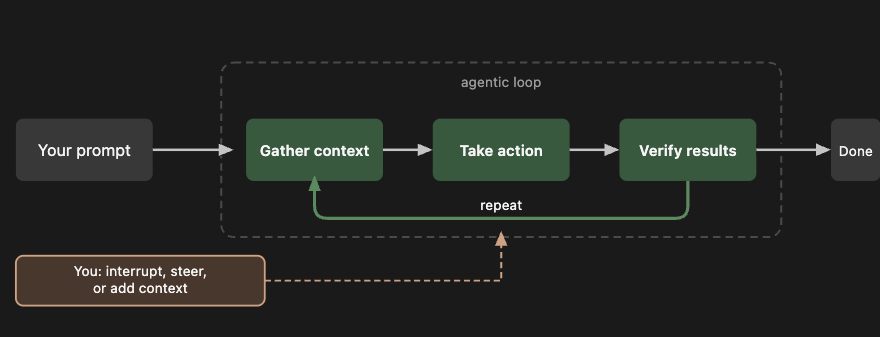
The models
There are a number of modules developed by Anthropic. You can change the model by using /model command in claude code. Default model is Opus 5.5 at the time i am writing this post.
The session
When you start claude in a directory, Claude get access to this directory. In default it can read files in project folder, it can read our terminal (also if you run a command inside claude cli with ! <command> it can also read the output), if there is git repo it can read its state, it can also read the CLAUDE.md file which is a special file for claude for make him not to forget about important instructions.
When you start claude in a folder, claude creates a jsonl file for this session of the folder. Sessions are stored in ~/.claude/projects/ folder. In this folder every directory is being grouped and every session conversation is stored in a separated file. You can have multiple sessions in the same folder by using /clear <session_name>.
When you start a new session in the same folder, other conversation information is not loaded into claude of your new session so you can work on different topics without mixing the previous tasks context.
You can delete the sessions by deleting the jsonl file or just running claude purge command.
The Tools
In default claude has multiple tools which allows it to do file operation, search, execution of shell commands, web tools and code intelligence operations.
You can extend the capability and knowledge of claude by using MCPS and Skills. MCP’s allows claude to access external tools such as Github or Jira. With skills, you can provide claude instructions and workflows so it doesn’t have to spend time for evaluating action.
You can list mcps with /mcp and skills with /skills command and you can add or connect any tool as you desire.
The Context Window
Every information and word which is loaded into your session is known as tokens (my definition of token might be wrong but you got the idea). Tokens mostly come from your conversation history, system prompts, tools directives and results, mcps, skills etc. All of these information is stored in a system component called as The Context Window. Current Claude models can support up to 1M token. Starting usage is something around 50-100k when you start a new session. Accoring to docs claude is intelligent enough to manage this context window and compacts it time to time.
You can see the composition of used context windows by running /context command
The Usage Modes
When you start your project, firstly at the bottom you will see an indicator which informs us that there a mode selection option for interacting with claude code. This is important because it changes the way of working with Claude. Following modes are available in claude code.
- auto mode: Which is non stop mode. Claude doesnt ask you what to do to accomplish a task
- manual mode: Every tool action such as updating a file or executing a terminal command is reviewed by operator. This is cautious approach but it is slower due to the fact that AI works millions of times faster then avarage human. Every action in claude code is tracked by checkpoints so you can undo what claude do if you dont like it.
- accept edits: More secure way of auto mode (did not use it yet)
- plan mode: In this mode claude does not do anything ,only it plans the task
By The Way Mode
Sometimes you need to ask a something to claude while it is executing an operation. You dont want to change the behaviour or stop its progress so that is the reason why /btw command is used. However dont forget that anything is talked in /btw session is not merged into current sessions context window.
What is Next Now ?
This is an extremely superficial introduction to agentic engineering. As i talked about it in Prologue this is just a beginning in this journey. In time by working with these tools i will be able to realize their capacity and limits. I will try to create entries about the parts which i found interesting to share or record.